Welcome to Charlieonline ScrappingBook


Hello everyone! Welcome to my blog.

Here you will find all my freebies: tutorials, scrapping elements or kits, and everything turns around PaintShopPro and Photoshop.
All my old works was done in Paint Shop Pro, so you had to have the program to open them, but now I am adding to my usual PSP scraps format the PS files, because recenty I began studying PhotoShop. Besides I thought to add also the Png file so my works can be used to most programs. If you have problems with a link, Please leave a message in the ChatBox and I will fix it. I would love to see what you make with my kits, that would be awesome! Thank You! Don't forget to leave a little love if you download, and Please Read My TOU's before you download any of my Presets, Scraps or use Tutorials. Thank You! Enjoy! Big hugs!


No al Nucleare - No alle Scorie Nucleari

NoNuclear

Thursday, September 30, 2010

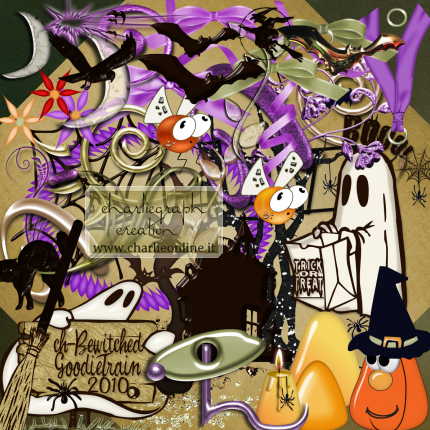
The October Goodie Train 2010

The "Bewitched" Goodie Train 2010

This month's theme is "Bewitched", it means Summer is off-(
Anyway.....

The most of the elements of my October Scrapkit are made with Photoshop

To know the other partecipating blogs go to.....The MainBlog Train Station.....HERE
Be sure to leave a little love where you download, and remember that we are not all on the same time zone so the kits may not all be available at the same time, so please just keep checking! Enjoy your stop!

-My GoodieTrain Section.....HERE
-My October GoodieTrain.....HERE

NOTE: This time I saved all the elements in to PNG format, while the Papers/rar file are JPG format, but oh Hight Resolution, so get your goodie below, and enjoy it!
Remember: Some of the elements saved on PNG format, are together to others, so they are in a only file, and you have to cut everyone you like to use. -)

-The Kit on PNG format.....HERE
-The Papers on JPG format.....HERE


Wednesday, September 29, 2010

Tutorial Tag Punpkins4Sale

This Tutorial was born during the preparations for my GoodieTrain - October ScrapKit(I put it online the 1st of October), so I used some of this ScrapKit elements to make it. It is no a Tutorial for saying how to create an element, I stopped to make similar tutorials for several problems, but it is one on the use of scrapping elements and other things, to make a tag. All the elements was created by me, exception the ghost, the landscapes(they are from sharing groups or found here and there on the net. I have them from a lot of time, and I don't remember the origin, but are believed to be for free use) and the leaves(they are a default PSP Pictures Tube).

Written at the end of September 2010.
Please, read My TOU's, before using results from my tutorial or elements

Go to the tutorial.....HERE

Friday, September 10, 2010

September 11 - Light a Candle

We Remember in this way - (Noi lo ricordiamo così)

http://www.charlieonline.it/11Settembre.php

Light a Candle on your Blog - (Accendi una candela nel tuo Blog)


Saturday, September 4, 2010

LearningPhotoshop - Intermediate

Hello all. I've just finished my Intermediate Lessons for Photoshop by Learning Photoshop Group.
If you are interessed, Join the Group.....HERE

Go.....HERE to see all my results

Tuesday, August 31, 2010

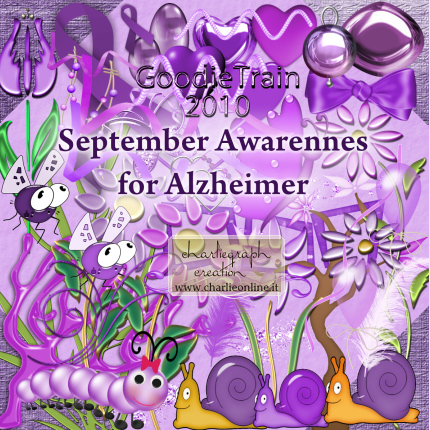
The September Goodie Train 2010

The "Awarennes/Causes" Goodie Train 2010

This month's theme is "Awareness"/Causes, so I chose to create a kit for "Alzheimer's", see I lost Mum last October after 14 years of this incurable, degenerative, and terminal illness.


No colour/palette has given for this month, but the purple ribbon is a symbol for this illness so..... all in chorus we say "I Think Purple"     
The most of the elements of my September Scrapkit are made with Photoshop

To know the other partecipating blogs go to.....The MainBlog Train Station.....HERE
Be sure to leave a little love where you download, and remember that we are not all on the same time zone so the kits may not all be available at the same time, so please just keep checking! Enjoy your stop!

-My GoodieTrain Section.....HERE
-My September GoodieTrain.....HERE

Remember: PSP and PNG format both included in the Kit/rar file, while the Papers/rar file are both in PSP and PS format, so get your goodie below, and enjoy it!
NOTE: Some of the elements saved on PNG format, are together to others, so they are in a only file, and you have to cut everyone you like to use. -)

-The Kit on PSP&PNG files.....HERE
-The Papers on PSP&PS files.....HERE


Saturday, August 28, 2010

My Site Updates - 1st

Hello everyone, how is by you? Here as usual!
I decided updating my site, because a lot of people write to me asking to add to my old scrapping works, done in PSP format, the PNG or PSD file. I think it'll be hard! But by now I have begun!
Please, leave a little love if you download, and if you have a problem with any links Please, leave a message in the chatbox, I will fix them. Thank You!
Note: Most of the PNG elements are in 1 only file, so you have to cut them, but don't worry, you'll have no difficulty to make it!

Below my first updates:

ScrapKits:
-Emerald ScrapKit.....HERE
Elements:
-Ballons.....HERE
-Balls-Bubbles.....HERE
-Butterflies.....HERE
-Doodles-Swirls.....HERE
-Embellishes-Jewels.....HERE
-Fans.....HERE

Soon other ones, so came back now and then!
Thanks for stopping in and enjoy your stay!

Wednesday, August 25, 2010

Calendar Mar

Just to show you some calendars I've done with pictures by my friend ©Mar
-For other MarCalendars go.....HERE
-For several CalendarsWatches, TimeWatches and CountDowns
Go to.....HERE


LinkWithin

Related Posts with Thumbnails